For Software as a Service (SaaS) companies, paid search is a powerful tool for reaching buyers who are actively seeking solutions. By bidding on keywords to appear at the top of search results pages (SERPs), SaaS brands can quickly gain visibility with potential customers who are researching topics relevant to their business. Paid search enables SaaS companies to connect with motivated buyers, drive qualified traffic, and generate conversions.
In this guide, you will find actionable tips for:
- Selecting keywords.
- Structuring campaigns.
- Best keyword match types to use for SaaS.
- Campaign optimization.
- Conversion tracking.
- Landing page optimization.
- Basic campaign settings you need to get right.
- Common pitfalls to avoid when running paid search campaigns for SaaS businesses.
How Paid Search Works
Paid search operates on an auction-based model where advertisers bid on keywords.
It uses a pay-per-click (PPC) approach, so companies only pay when a user clicks on their ad. This model offers the benefits of cost control because spend can be paused or turned on at any time, and performance control because you only pay when you get clicks.
Key factors influencing ad ranking include bid amount, ad quality, and ad relevance to the search query. Major platforms for paid search include Google Ads and Microsoft Ads.
Unlike organic search (SEO), which relies on content quality and backlinks to earn rankings, paid search offers immediate visibility.
Why Paid Search Works For SaaS
One of the biggest challenges for SaaS go-to-market teams, especially in B2B, is timing.
An organization may only be in-market to buy software at specific moments.
Paid search allows SaaS companies to get in front of those actively seeking solutions, overcoming the timing challenge and resulting in higher conversion rates from traffic to leads and leads to won ARR.
Paid search also provides detailed analytics for tracking every click, conversion, and dollar spent, enabling companies to optimize their campaigns effectively.
It supports rapid experimentation with offers, messaging, and landing pages while maintaining strong budget control.
Tips To Run Paid Search For SaaS
Tip 1: Understand How Keywords Map To The Buyer's Journey
To build impactful paid search campaigns, you need to first select the right keywords.
The buyer awareness funnel is a framework that helps SaaS marketers understand where potential customers are in their journey, so they can tailor messaging, keyword targeting, and offers to each stage.
By aligning paid search campaigns with the funnel, you ensure that your ads resonate with users’ current needs and readiness to buy, maximizing both relevance and ROI.
Overview Of The Buyer Awareness Funnel
Unaware: Buyers in this stage do not realize they have a problem that your SaaS product can solve. They are not actively researching problems or solutions ruling out paid search for targeting this group of potential buyers.
Problem Aware: At this stage, potential customers recognize they have a problem but are unsure of how to solve it. They may search for information about their pain points, providing an opportunity for SaaS companies to guide them toward solutions.
Solution Aware: These individuals have identified the type of solution they need but are not yet familiar with specific products. They actively search for the best options available, often through comparisons.
Product Aware: Buyers in this stage are aware of your specific product and are considering it as a potential solution. They are evaluating how it compares to competitors and seeking detailed information.
Most Aware: At this final stage, buyers know your product or a competitor’s product and are near a purchase decsion.
Tip 2: Select Solution Focused Keywords
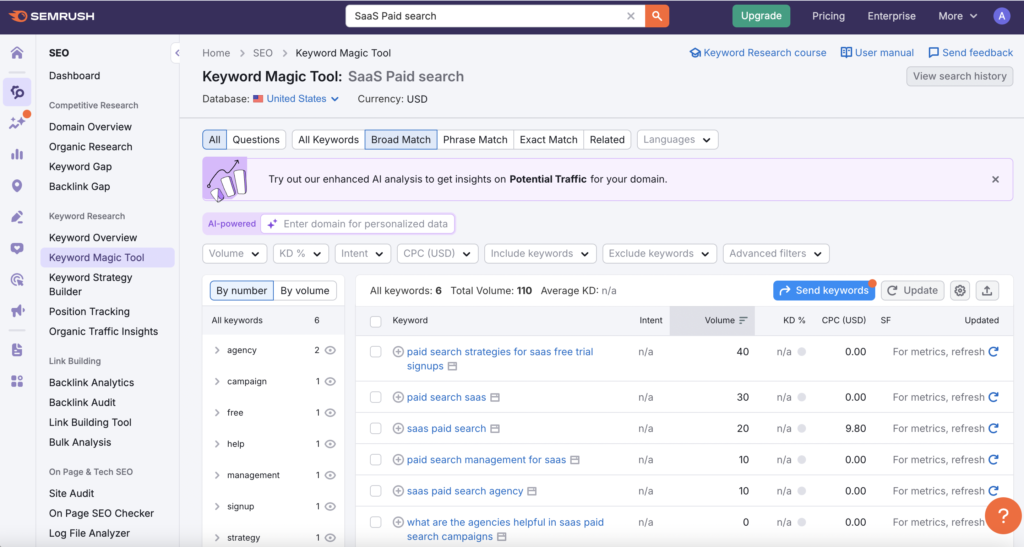
Start with in-depth keyword research using tools like SEMrush or Google Keyword Planner.
Map keywords to the buyer awareness funnel: Problem Aware, Solution Aware, Product Aware, and Most Aware.
Prioritize solution-aware keywords (for example, “best CRM software” or “CRM for SaaS companies”). Paid search is expensive, so you want to invest in keywords that are likely to yield a return in the near term to justify the cost.
Solution-aware keywords are more likely to deliver near-term ROI because they target users who are actively searching for a specific solution and are closer to making a purchase decision.
Problem-aware keywords are better suited for SEO because buyers at this stage are further from a purchase decision and may never become customers, which makes it harder to justify the higher cost of paid search advertising. Unaware keywords don’t exist as search terms, so reaching an unaware audience is better suited for channels like organic social.
Tip 3: Create Single Theme Ad Groups
Structure ad groups around tightly related keyword themes, such as “Best CRM,” “CRM software,” or “Customer Relationship Management Software.”
Each ad group should have highly relevant ad copy and landing pages. This improves Quality Score and lowers CPC by allowing you to create ads that are highly relevant to keywords, which Google rewards with better placement and lower costs.
For example, separate ad groups for “CRM for small business” versus “CRM for enterprise” can enhance targeting effectiveness.
Regularly audit your ad groups to ensure they remain tightly themed as your keyword list evolves.
Tip 4: Use Broad Match
In paid search platforms such as Google Ads, you can control how closely a user’s search query must match your keyword before your ad appears.
This control is managed through what’s known as match types. Match types determine how flexible or restrictive your targeting is, from highly specific to more open ended, and they play a key role in how efficiently your ads reach the right audience.
Keyword match types define how your ads trigger based on user searches. There are three primary match types:
Broad Match:
The default and most flexible match type. In Google Ads, you enter broad match keywords without any punctuation, for example: CRM software.
When using broad match ads can show for searches that include your keyword, or searches that contain the same meaning or are related to your keyword.
Phrase Match:
Ads show for searches that include the exact phrase or meaning of your keyword, with any additional words before or after it.
In Google Ads, you enter phrase match keywords in quotation marks, for example: “CRM software.”
Exact Match:
The most restrictive match type. In Google Ads, you enter exact match keywords by surrounding the keyword in brackets, for example: [CRM software].
Ads only show for searches that match your keyword exactly or are very close variations.
While many advertisers lean toward phrase or exact match for greater control, broad match has evolved to become a powerful tool when paired with smart bidding and quality conversion data.
Leveraging broad match lets you capture a wider range of relevant searches, including synonyms and related terms, helping uncover new high converting keyword variations and expand your reach. For example, a broad match on “CRM software” can surface searches like “customer relationship management tools” or “best CRM solutions.”
Used strategically, broad match can drive more qualified traffic, improve campaign efficiency, and help Google’s AI identify new opportunities you might not have considered.
Tip 5: Do Search Term Optimization
Understanding search terms is a key part of managing match types effectively.
In Google Ads, the keywords you bid on are what you want your ads to show for, while search terms are the actual words and phrases users type into Google that triggered your ads.
This distinction is important because even with tight match types, your ads can still appear for unexpected or irrelevant searches.
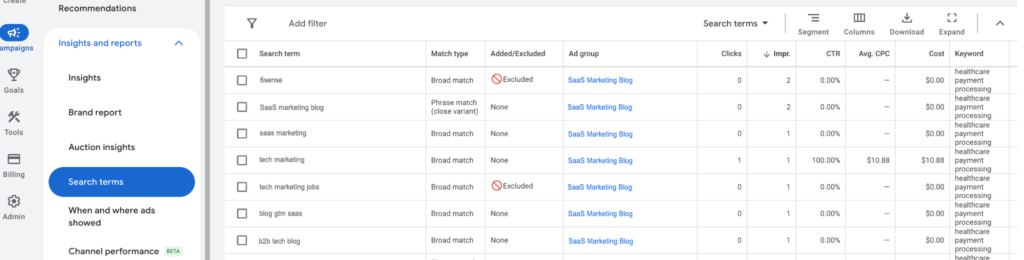
You can find the Search Terms Report in Google Ads by navigating to your campaign, selecting “Insights and reports”, and then choosing “Search terms” from the menu.
This report shows every search query that led to a click or impression on your ad. Reviewing it regularly helps you understand which queries are driving qualified traffic and which are wasting spend.
Review your search term reports daily to identify irrelevant or low-performing queries.
Add negative keywords to block unwanted traffic and improve campaign efficiency. For example, exclude terms like free, jobs, or irrelevant industries if they don’t relate to your offerings. Over time, this helps refine your targeting so your ads only show for searches with high intent.
Tip 6: Upload Offline Conversions
Uploading offline conversion data (MQLs, SQLs, closed deals) into Google Ads is key for optimizing paid search campaigns for SaaS businesses.
Offline conversion data helps train Google Ads AI on data around your real desired business outcomes rather than just surface-level actions.
Most advertisers typically track conversion points like button clicks and form submissions.
However, this approach can lead to sending a lot of spam or low-quality conversions to Google Ads.
Many SaaS companies receive a significant amount of spam, job seekers, and end consumers—especially for consumer-facing products. This influx of irrelevant data can train Google’s AI on the wrong conversions, ultimately skewing campaign performance.
By uploading offline conversion data, you enable Google Ads to optimize for high-value actions from high-value people that impact your bottom line.
Offline conversions can be uploaded either via integration with popular CRMs like HubSpot or Salesforce, or through manual uploads using spreadsheets.
Tip 7: Get Your Location Settings Right
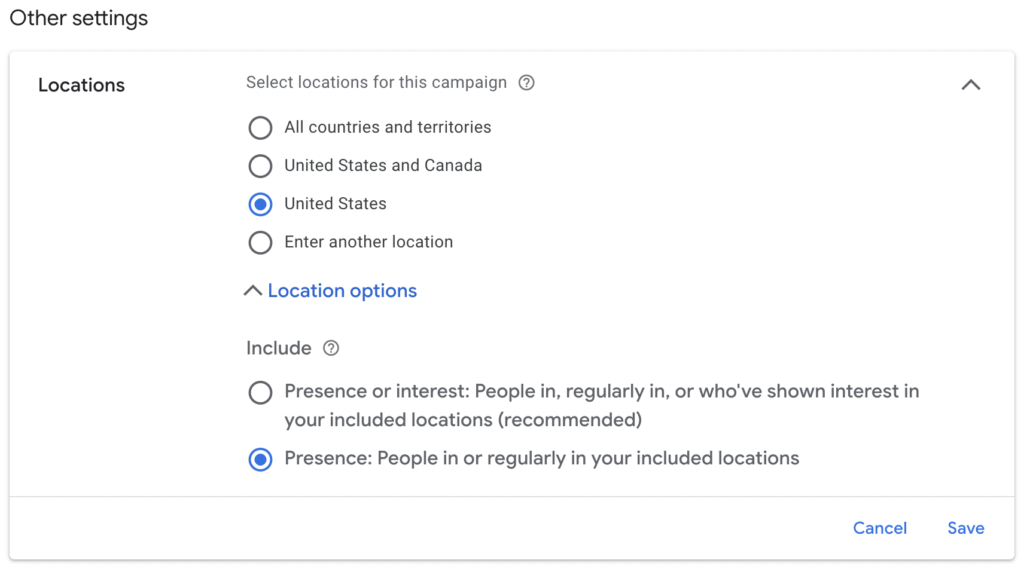
When running Google Ads paid search campaigns make sure you target users who are physically located in your desired regions, not just those “interested in” your location.
In Google Ads, navigate to Settings, then Locations, then Target, and select “People in or regularly in your targeted locations.” This helps avoid wasted spend on irrelevant geographies.
Tip 8: Deselect The Google Display Network & Google Search Partners Placements
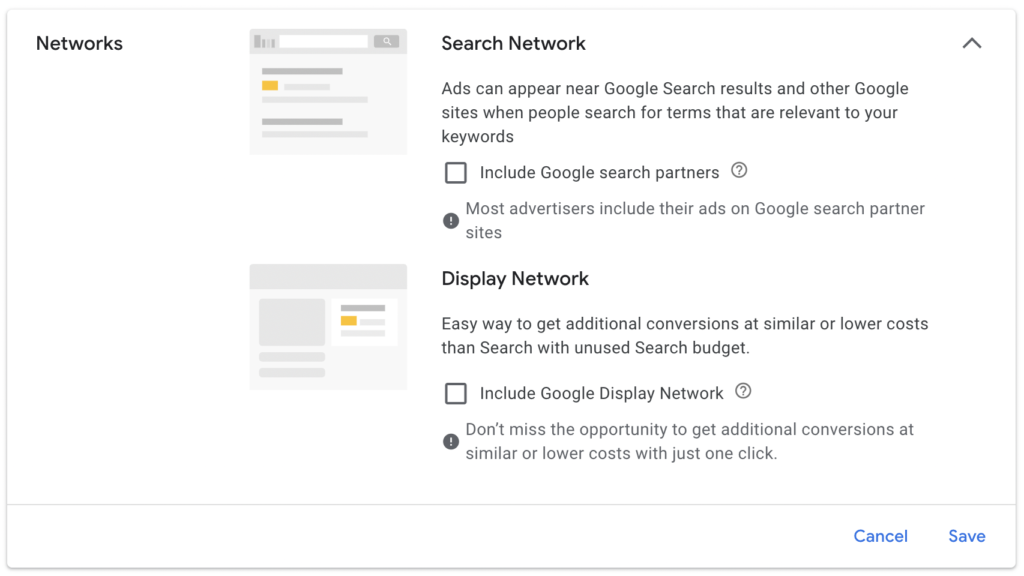
Deselect the Google Display Network and Google Search Partners placements. Traffic quality from the Google Display Network and Search Partners is often poor and both placements are selected by default.
Focus your budget on high-intent search placements to avoid wasted spend on low-performing channels.
While your overall cost per click may be higher without the Google Display Network and Google Search Partners placements, you’ll likely see a lower overall cost per conversion and a higher conversion rate from the improved traffic quality.
This setting can be found under Campaign Settings > Networks in Google Ads.
Tip 9: Optimize Your Landing Pages For Conversions
Create landing pages that convert visitors into qualified leads by aligning every element with your target keywords.
Include the main keyword from your ad group or campaign in your h1 headline —this signals relevance to both users and Google.
Add trust-building social proof, such as client logos, testimonials, or media mentions.
Keep your design fast-loading, mobile-friendly, and minimal, ensuring nothing distracts from your main goal.
Include a single call to action, such as Start Free Trial, Book a Demo, or Request Pricing.
Remove extra navigation and links that could pull users away from converting.
Tip 10: Continuous Campaign Improvement
Set up regular campaign audits, either weekly or monthly, to review performance by keyword, ad group, and landing page.
Test new ad copy, extensions, and landing page variations. Monitor conversion rates, cost per acquisition (CPA), and return on ad spend (ROAS).
Use A/B testing and experiment with bidding strategies. Solicit feedback from sales and customer success teams to refine targeting and messaging. Document your learnings and apply them to future campaigns for ongoing improvement.
Most Common Paid Search Pitfalls To Avoid
- Outsourcing to inexperienced agencies: Relying on agencies that do not have proven paid search experience will lead to wasted budgets and ineffective campaigns. Ensure that any agency you work with understands your business and paid search. Ask for case studies and references before committing.
- Neglecting offline conversion data: Failing to utilize offline conversion data can result in training Google Ads AI on irrelevant leads, which can skew your campaign performance. Set up regular data uploads and review conversion quality with your sales team.
- Failing to optimize landing pages: Directing traffic to poorly designed or irrelevant landing pages can lead to high bounce rates and low conversion rates. Ensure that landing pages are optimized for the keywords in your ads and provide a seamless user experience. Use heatmaps and user recordings to identify friction points.
- Not testing enough: Relying on a single ad copy or landing page variation can limit your learning. Always be testing new ideas to find incremental improvements.
- Making too many changes too quickly: Avoid frequent edits to your Google Ads campaigns. Allow at least two weeks after significant updates before evaluating performance. Each major adjustment restarts Google’s machine learning optimization period, meaning it needs time to relearn and stabilize results.
Key Takeaways For Paid Search For SaaS
Paid search can be one of the most effective and measurable growth channels for SaaS companies when managed with a strategic, data-driven approach.
Long-term success comes from precise keyword targeting, well-organized campaign structures, using proven account settings, and ongoing optimization of search terms and landing pages. Equally important is connecting your marketing and sales data.
Remember, the most successful SaaS paid search campaigns are those that evolve with data and market feedback. Make optimization a habit, not a one-time event.